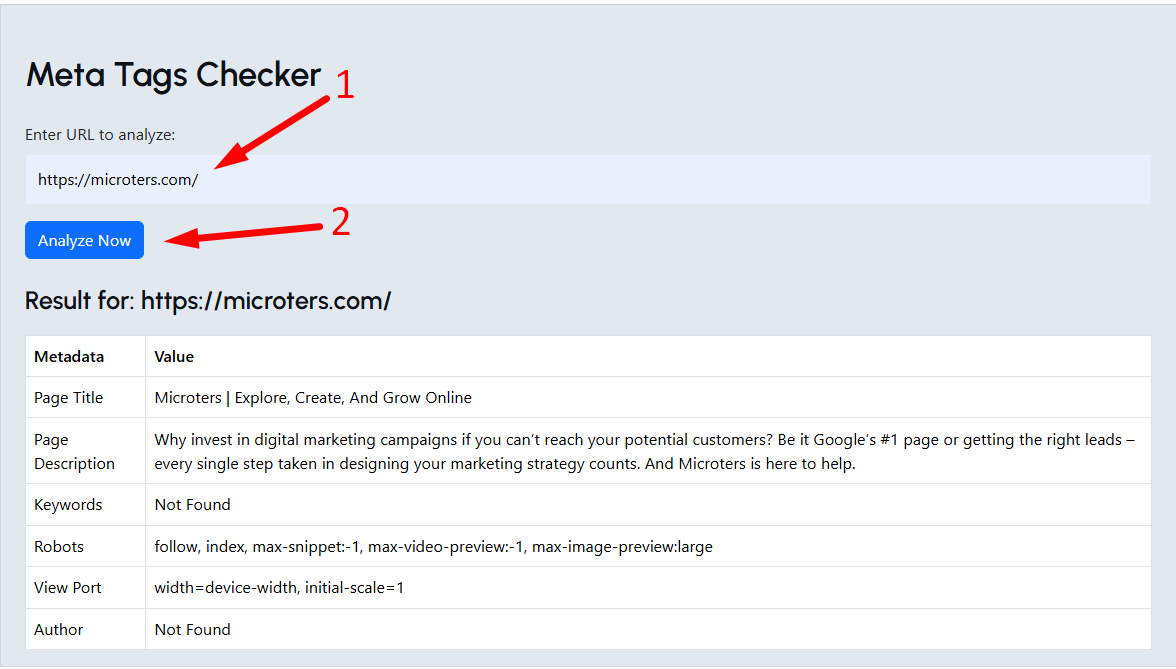
Meta tags checker
Created on 13 November, 2025 • Checker Tools • 0 views • 2 minutes read
A Meta Tags Checker is an essential SEO tool that analyzes the meta tags on your website to ensure they are optimized for search engines. Meta tags—such as the title tag, meta description, and keywords—play a vital role in determining how your web pages ap
Meta Tags Checker: Optimize Your Website’s SEO Effectively
What Is a Meta Tags Checker?
A Meta Tags Checker is an essential SEO tool that analyzes the meta tags on your website to ensure they are optimized for search engines. Meta tags—such as the title tag, meta description, and keywords—play a vital role in determining how your web pages appear in search results. Using a meta tags checker helps identify missing, duplicate, or poorly optimized tags that may affect your site’s visibility and ranking.
Why Meta Tags Are Important for SEO
Meta tags provide search engines with critical information about your webpage’s content. When optimized properly, they help improve click-through rates (CTR), search visibility, and keyword relevance. Without proper meta tags, your website might struggle to appear for targeted keywords, even with quality content.
Key Benefits of Optimizing Meta Tags
Improves search rankings by providing relevant keyword information.
Enhances user experience with clear and appealing snippets in search results.
Prevents duplicate content issues by ensuring unique meta data for each page.
Increases CTR by encouraging users to click your link over competitors.
How a Meta Tags Checker Works
A Meta Tags Checker scans your webpage’s HTML code to extract and analyze metadata, including:
Title Tag: The clickable headline that appears in search results.
Meta Description: A short summary that describes your page’s content.
Meta Keywords: Though less used by search engines today, they still help in organizing content.
Robots Meta Tag: Instructs search engines whether to index or follow your page.
Open Graph and Twitter Tags: Help optimize how your content appears on social media.
The checker identifies issues such as missing tags, overly long titles, keyword stuffing, or duplicate descriptions, allowing you to make precise improvements.
How to Optimize Your Meta Tags
1. Write Unique Title Tags
Each page should have a title under 60 characters that includes your main keyword and clearly describes the content.
2. Craft Compelling Meta Descriptions
Use 150–160 characters to summarize the page, include a call-to-action, and naturally add target keywords.
3. Avoid Keyword Stuffing
Use keywords strategically without overloading the tag, as it may harm SEO rankings.
4. Include Branding
Add your brand name to titles where relevant for better recognition.
5. Check Regularly with a Meta Tags Checker
Regularly auditing your meta tags ensures that your SEO remains up to date with algorithm changes.
Benefits of Using a Meta Tags Checker
Quickly identify SEO issues within your website’s metadata.
Boost ranking potential by optimizing page titles and descriptions.
Enhance social sharing appearance with proper Open Graph tags.
Improve overall SEO strategy through data-driven optimization.
Conclusion
A Meta Tags Checker is a powerful tool for maintaining a well-optimized website. It helps you fine-tune titles, descriptions, and keywords to align with SEO best practices. By regularly checking and updating your meta tags, you can enhance visibility, attract more organic traffic, and improve your overall search engine performance.
SEO Keywords:
Meta Tags Checker, check meta tags online, SEO meta tag analysis, meta description checker, website SEO optimization, HTML meta tags tool, title and description analyzer
Categories
Popular posts
-
DNS LookupChecker Tools • 1 views
-
IP LookupChecker Tools • 1 views
-
Reverse IP LookupChecker Tools • 1 views
-
SSL LookupChecker Tools • 1 views
-
PingChecker Tools • 1 views